CompKit Game Engine
A modular instant win game system for WooCommerce, built to integrate directly with
Giveaways for WooCommerce by Flintop.
Overview
CompKit Game Engine enhances WooCommerce orders with interactive instant win game reveals.
When a customer purchases an eligible giveaway product, a game (such as a spin wheel, slots, or scratch card)
is shown to reveal either a winning result or a non-win outcome.
Requirements
- WooCommerce
- Giveaways for WooCommerce by Flintop
- HTTPS enabled site
Installation
- Install and activate the CompKit Game Engine plugin
- Install and activate Giveaways for WooCommerce by Flintop
- Open CompKit Game Engine from the WordPress admin menu
- Enter and validate your license keys for each module
- Enable the modules you want to use
CompKit automatically creates the required game product categories (such as Spin, Slots, and Scratch)
if they do not already exist.
To assign a game to a giveaway product, simply apply the corresponding game category to the product.
The selected category determines which instant win game will appear after checkout.
All game results are driven by the tickets and Prize Groups configured within
Giveaways for WooCommerce by Flintop. Prize Groups must be fully set up for games
to function correctly, as CompKit converts these ticket outcomes into interactive
instant win experiences.
After setup, place a real test order to confirm games are displaying and revealing results correctly.
Administration
All CompKit Game Engine settings are managed from the
CompKit Game Engine menu within the WordPress admin dashboard.
From the main dashboard you can:
- Enter and validate license keys for each game module
- Enable or disable individual modules
- Access each module’s customization settings
- View current license status and activation state
Module settings control the appearance, behaviour, and user experience of each instant win game,
while licensing determines which modules are active on your site.
>
Spin Wheel
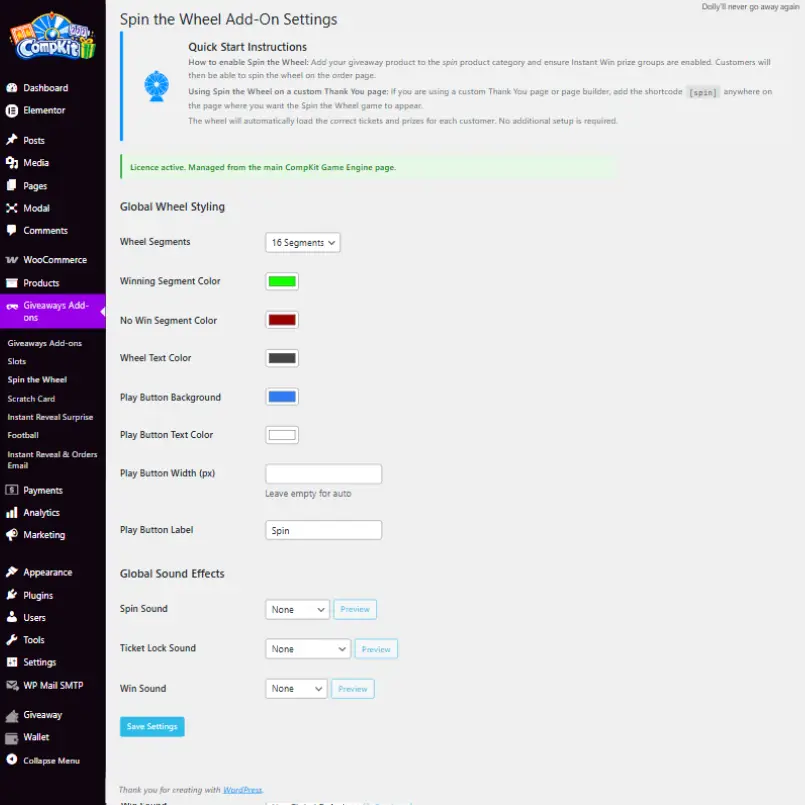
The Spin Wheel module displays an interactive wheel after checkout to instantly reveal
whether a customer has won a prize or not. The wheel automatically pulls ticket and prize
data from Giveaways for WooCommerce.
From the Spin Wheel settings panel you can fully customize the game appearance and behaviour, including:
- Number of wheel segments
- Winning and non-winning segment colours
- Wheel text colour
- Play button colour, text, and width
- Custom play button label
- Sound effects for spinning, ticket lock, and wins
The wheel can appear automatically on the order confirmation page or be placed manually
on custom thank you pages using the [spin] shortcode.
No manual prize setup is required. The wheel dynamically loads the correct giveaway tickets
and prize outcomes for each customer.
Slots
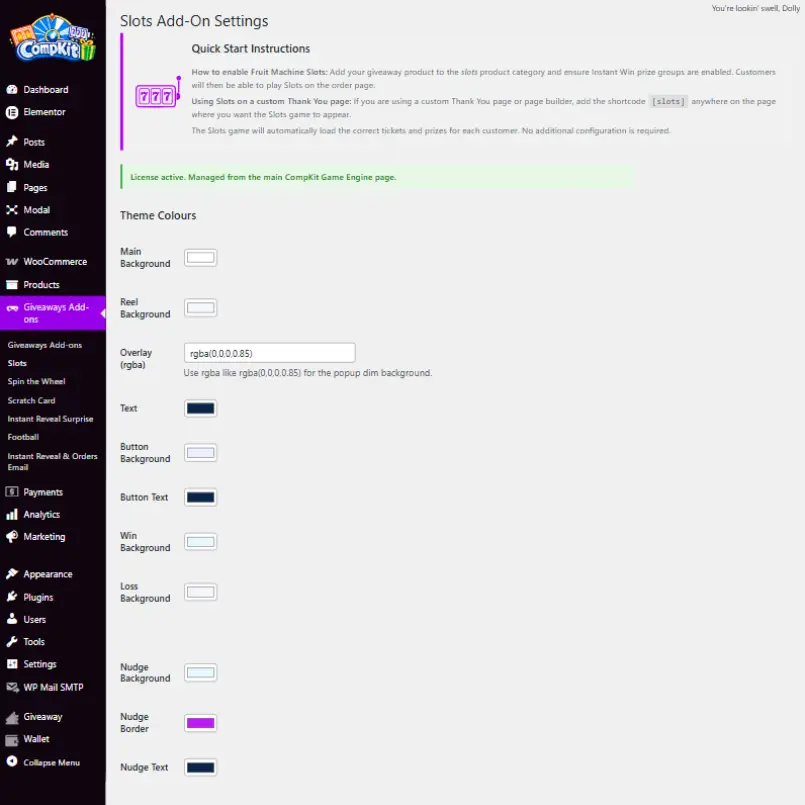
The Slots module displays an animated slot machine after checkout to instantly reveal
winning or non-winning ticket outcomes. Like all CompKit games, it automatically pulls
ticket and prize data from Giveaways for WooCommerce.
The Slots settings allow full visual customization of the game interface, including:
- Main background and reel background colours
- Popup overlay transparency (RGBA support)
- Text and button colours
- Win and loss background colours
- Nudge highlight colours and borders
- Nudge text styling
The slot machine can display automatically on the order received page or be placed on
custom thank you pages using the [slots] shortcode.
No manual configuration is required for prizes. Each customer’s results load dynamically
based on their giveaway tickets.
Scratch Card
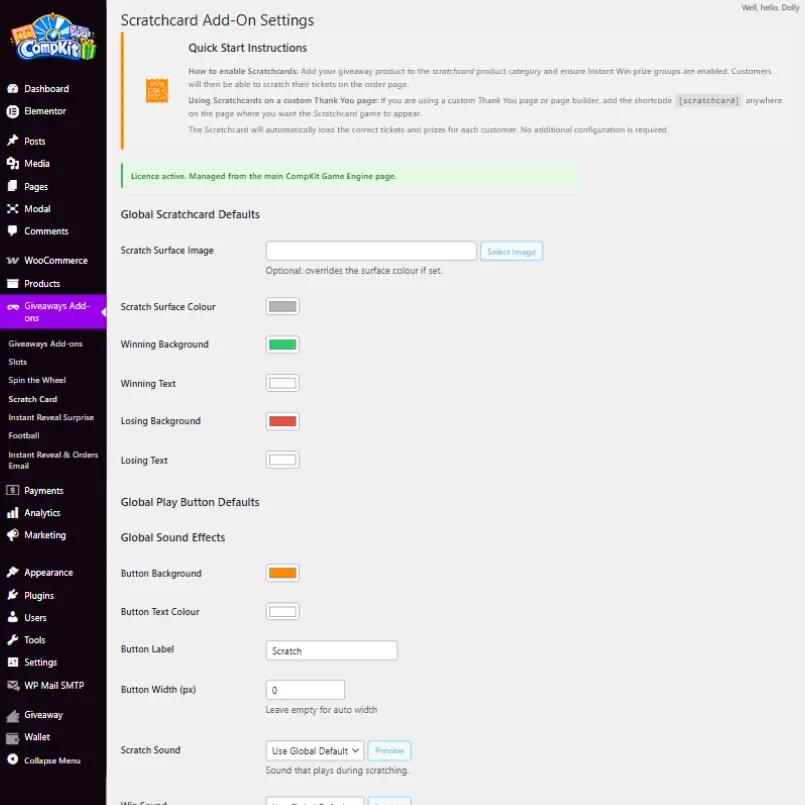
The Scratch Card module displays a scratchable surface after checkout that reveals
each customer’s win or loss result instantly. Ticket outcomes are pulled automatically
from Giveaways for WooCommerce.
You can customize both the scratch surface and reveal states using the global defaults, including:
- Custom scratch surface image or solid colour
- Winning and losing background colours
- Winning and losing text colours
- Play button background, text colour, label, and width
- Scratch sound effects
The scratch card appears automatically on the order confirmation page or can be added
to custom thank you pages using the [scratchcard] shortcode.
No prize configuration is required within the module. Results are generated dynamically
based on the giveaway tickets in each order.
Instant Reveal (On Screen)
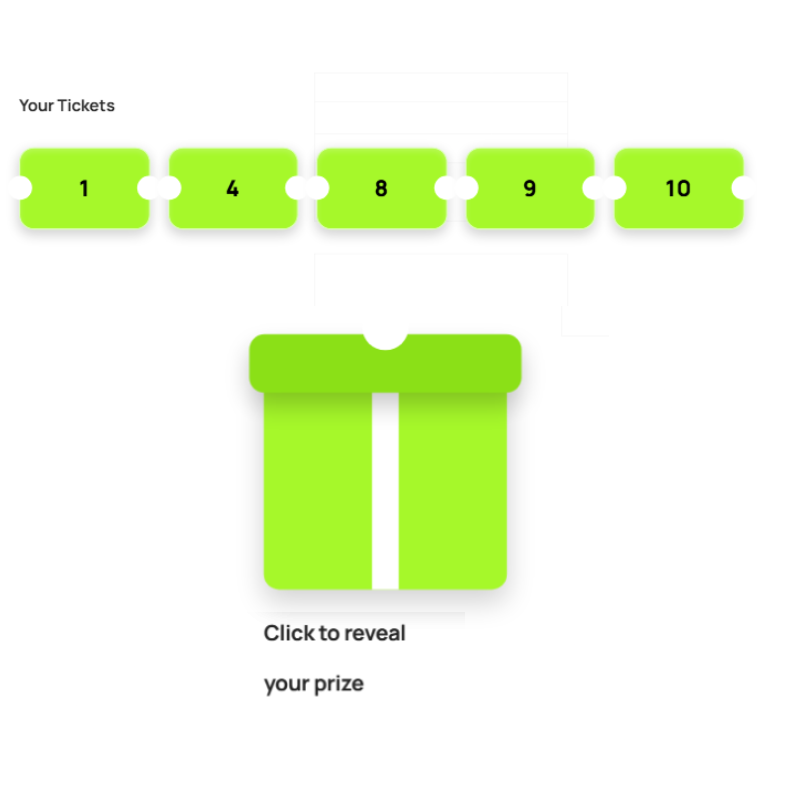
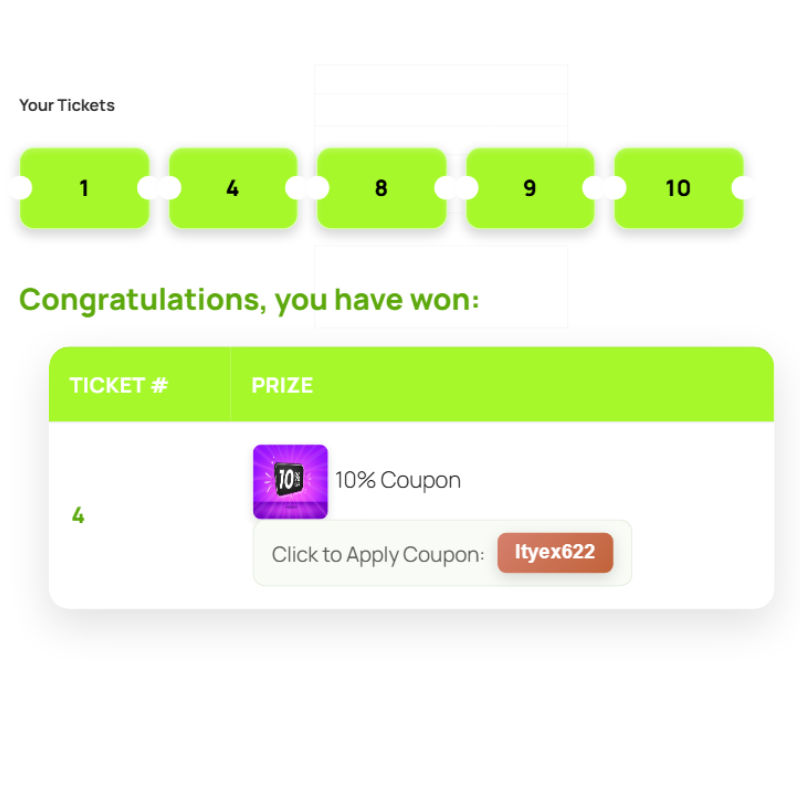
The Instant Reveal Display shows customers their giveaway results directly on screen
after checkout and on the order view page inside their account.
Customers first see their allocated ticket numbers and interact with a reveal element
to uncover their prize outcome instantly.
When a win occurs, the system displays a clear prize summary, including:
- The winning ticket number
- The prize name and image
- Any associated coupon codes with one click apply functionality
All results are generated automatically based on the tickets issued by
Giveaways for WooCommerce, with no manual setup required inside CompKit.
Instant Reveal (Email)
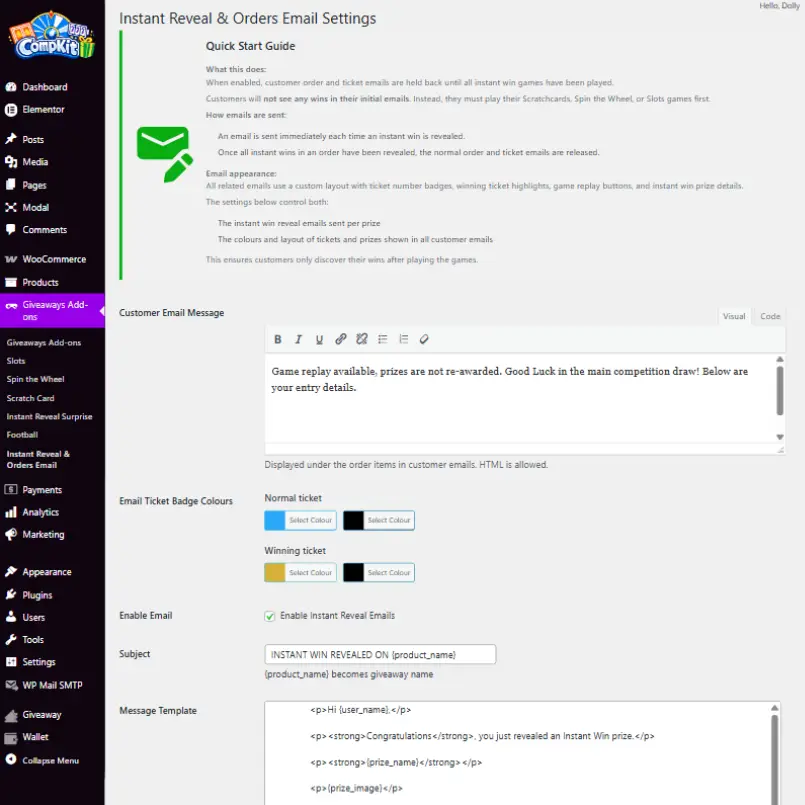
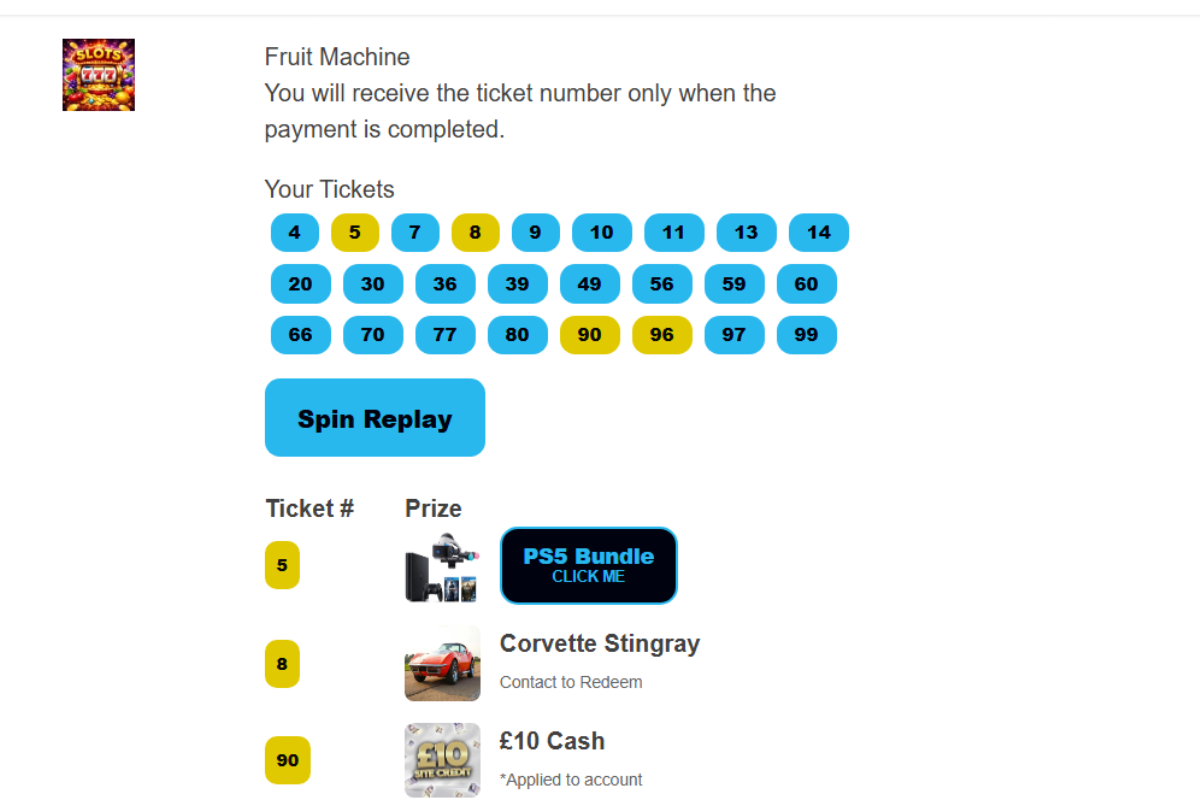
The Instant Reveal Email module controls how giveaway results are delivered through
WooCommerce order emails and ensures customers only discover wins after playing
the instant win games.
When enabled, standard order and ticket emails are temporarily held until all instant
win games in the order have been played.
Once a customer reveals a result:
- An instant reveal email is sent immediately for each revealed win
- Normal WooCommerce order and ticket emails are released once all reveals are completed
- Winning tickets are visually highlighted inside emails
- Prize images and details are included for clear confirmation
The email appearance and messaging can be customized, including:
- Custom email message content (HTML supported)
- Ticket badge colours for normal and winning tickets
- Email subject line templates
- Prize layout and styling
This ensures customers engage with the games first while still receiving a full
prize summary by email afterwards.
Licensing
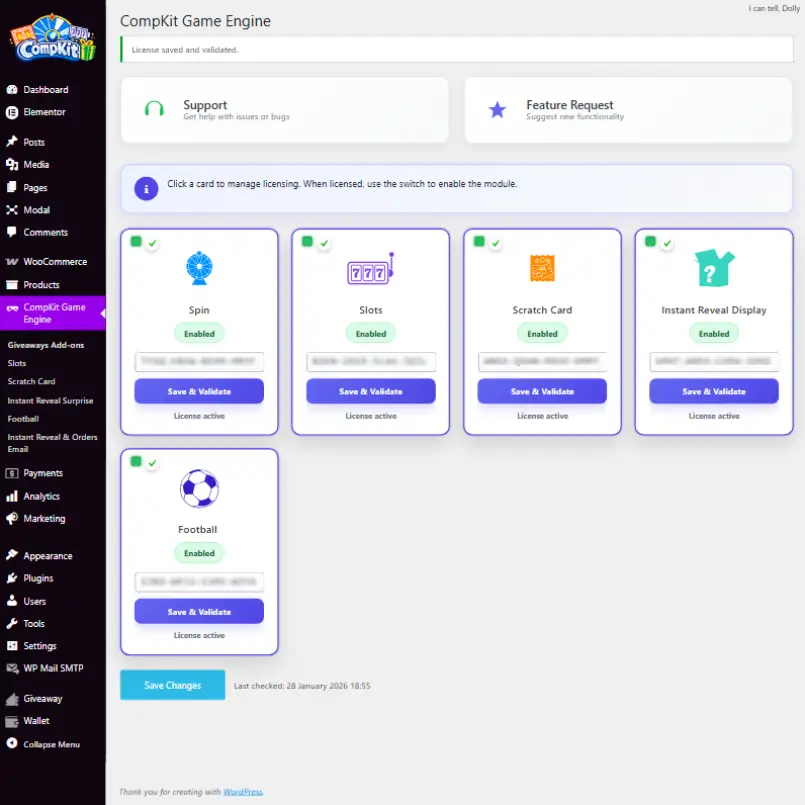
CompKit Game Engine uses individual license keys to activate each game module.
Licensing is managed from the main CompKit Game Engine dashboard inside WordPress.
Each module card allows you to:
- Enter and validate a license key
- Enable or disable the module using the toggle switch
- View the current license status
Once a license is successfully validated, it becomes locked to the domain it was activated on
(including subdomains) and the license term begins.
All modules must show an active license status in order to function.
If a license becomes invalid or inactive, the related game assets will be disabled automatically.
Frontend Behaviour
CompKit Game Engine does not generate its own results. All game outcomes are built directly from
the tickets and prize data created by Giveaways for WooCommerce by Flintop.
Whatever tickets are issued by Giveaways for Woocommerce by Flintop are converted into the selected instant win game
experience (Spin Wheel, Slots, Scratch Card, or Instant Reveal).
Prize Groups must be fully configured within Giveaways for WooCommerce for games to function correctly.
CompKit uses these prize groups to determine winning tickets, prize images, and reveal results.
If prize groups are missing, incomplete, or misconfigured, games may not display correctly
or may not produce valid results.
CompKit acts purely as a frontend transformation layer, turning standard giveaway tickets into
interactive reveal experiences without altering the underlying giveaway logic.
Shortcodes
CompKit Game Engine automatically injects games into the default WooCommerce order received page.
Shortcodes are only required when using a custom thank you page or custom order layout.
Each shortcode outputs a specific game module:
[spin]
[slots]
[scratchcard]
[instant_reveal]
These shortcodes can be placed anywhere within a custom order confirmation template,
including inside loops that render order items.
When using a fully custom thank you page, make sure the WooCommerce order context is restored
(using wc_setup_order_globals() and the order received query variables) so that
CompKit can correctly load ticket data and reveal results.
Games will only display when the order contains eligible giveaway products.
If no qualifying products exist, the shortcodes will output nothing.
In most cases, placing the shortcodes inside the
woocommerce_order_item_meta_end hook (as shown in the example custom template)
is recommended, as this ensures each game is associated with the correct product and tickets.
Performance
CompKit Game Engine is built to load only what is required for each page and order.
Game scripts, styles, and assets are injected only when a qualifying giveaway product
is present or when a game shortcode is used.
License validation responses are cached to reduce external requests and prevent
unnecessary processing on every page load.
Pages without giveaway products or CompKit shortcodes remain unaffected and load
with no additional overhead.
Troubleshooting
- Ensure each module has a valid and active license key
- Confirm Giveaways for WooCommerce by Flintop is installed and active
- Verify the order contains eligible giveaway products
-
Check that the required product categories exist and are assigned correctly
(CompKit automatically creates game categories such as Slots, Spin, and Scratch if missing) - Place a real test order after installation or updates to confirm game rendering
Operations
- Activate on the domain you plan to use, once validated the license locks to that domain (including subdomains)
- Installation and activation are done on live sites only
- The 1 year license period starts from first successful validation
- Always place a real test order after installing or updating
- Changing domains requires opening a support ticket to transfer the license