
From Install to Interactive Reveal in Eight Steps
CompKit is an add-on for an existing giveaway setup. Get the foundations in place, switch on the right options, brand the games to match your store, and your reveals come to life.
Setup steps
Install WooCommerce
Make sure WooCommerce is installed, activated and configured on your WordPress 6.0+ site running PHP 7.4 or newer.
Install Giveaway for WooCommerce by Flintop
CompKit is built exclusively for this plugin. Install and activate it before adding CompKit.
Install CompKit Game Engine
Add the free CompKit plugin from your WordPress dashboard and activate it. Instant Reveal is available immediately.
Enable Instant Win & Prize Groups
In the Giveaways settings, turn on Instant Win and Prize Groups. CompKit needs both to know what to reveal.
Assign products to the Instant Reveal category
Add your giveaway products to the Instant Reveal category, then choose the free Instant Reveal or any unlocked premium game.
Brand each game to match your store
Open a game's settings and make it yours — match your colours, drop in your own artwork and sponsor advertising boards, tweak the layout, relabel buttons and toggle sounds, all with a live preview. Set global defaults once, then override per product for one-off or seasonal draws. No code required.
Customers reveal results after checkout
Once an order completes, the reveal game runs on the order confirmation page — while the Smart Email Delay Handler holds spoiler emails.
Unlock premium games inside the plugin
Open the CompKit licence screen in WordPress admin to activate premium game modules. Licences are purchased and managed there — not on this website.
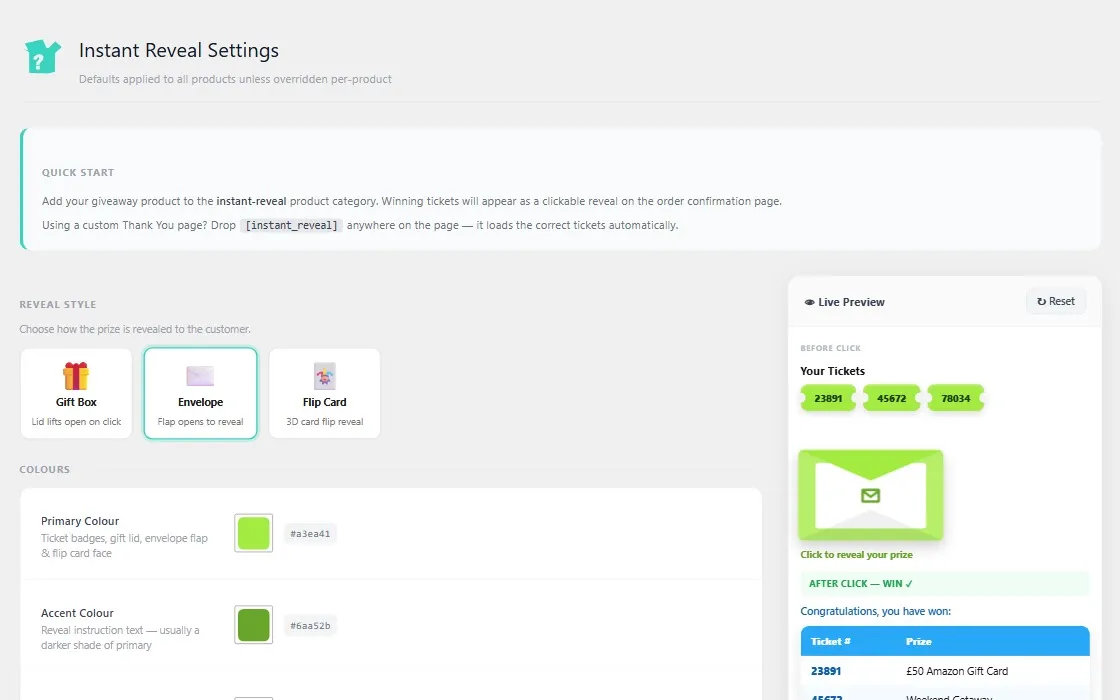
Configured Where You Already Work
Everything is managed from familiar WordPress and WooCommerce screens. Global defaults apply across all products, with per-product overrides when you need them.
- Global theme and behaviour for every reveal.
- Per-product overrides on each giveaway product.
- Reveals display automatically on order confirmation.